Article
Best Free Website Builders in 2026 - Build Your Site for $0
Create a professional website without spending a dime. We tested the top free website builders to find which offer the best templates, features, and upgrade paths.

Building a website doesn’t require a big budget. Free website builders offer powerful tools to create professional sites for personal projects, portfolios, small businesses, and even online stores—all without spending a penny.
We tested 15 free website builders, creating real websites to evaluate templates, features, limitations, and overall value. Here are the 10 best free website builders that deliver genuine functionality in 2026.
Quick Comparison
| Builder | Best For | Templates | Rating |
|---|---|---|---|
| 1. Wix Free | Best Overall Free Builder | 900+ templates | ★4.7/5 |
| 2. Square Online Free | Best Free Ecommerce | 3 templates | ★4.6/5 |
| 3. WordPress.com Free | Best for Blogging | 50,000+ themes | ★4.5/5 |
| 4. Weebly Free | Best for Beginners | 50+ templates | ★4.4/5 |
| 5. SITE123 Free | Best for Quick Setup | 180+ templates | ★4.3/5 |
| 6. Carrd Free | Best for Landing Pages | 60+ templates | ★4.2/5 |
| 7. Google Sites | Best for Google Workspace | 12+ templates | ★4/5 |
| 8. Webflow Free | Best for Designers | 100+ templates | ★4/5 |
| 9. Strikingly Free | Best Mobile-First Design | 40+ templates | ★3.9/5 |
| 10. MailerLite Websites Free | Best for Email Marketing Integration | 40+ templates | ★3.8/5 |
Our Top Picks in Detail

Wix Free
Wix Free offers the most comprehensive free website building experience with 900+ professionally designed templates, an intuitive drag-and-drop editor, and AI-powered tools. While you're stuck with a random subdomain like 'divinely404.wixsite.com/lollipeppa' and Wix branding, the feature set is unmatched for creating portfolios, blogs, and personal websites.
Pros
- ✓2,500+ professional templates
- ✓Powerful drag-and-drop editor
- ✓AI-powered design assistance
- ✓Built-in SEO tools
- ✓App marketplace with extensions
Cons
- ✗Random subdomain (can't customize)
- ✗Wix branding and ads displayed
- ✗No ecommerce functionality

Square Online Free
Square Online Free is the only truly free website builder with full ecommerce capabilities, allowing unlimited products, payment processing, Square POS sync, and advanced features like gift cards and Instagram shops. The tradeoff is minimal design flexibility with just 3 templates and standard payment processing fees.
Pros
- ✓Full ecommerce on free plan
- ✓Unlimited products listing
- ✓Square POS integration
- ✓Instagram shops support
- ✓Gift cards and curbside pickup
Cons
- ✗Only 3 templates available
- ✗Limited customization options
- ✗2.9% + $0.30 transaction fees
WordPress.com Free
WordPress.com Free provides the world's most popular blogging platform at no cost, with access to thousands of themes and powerful content management tools. While limited to a wordpress.com subdomain with ads displayed, it's unbeatable for bloggers and content creators who prioritize writing and SEO.
Pros
- ✓Powerful blogging platform
- ✓Access to 50,000+ themes and plugins
- ✓Excellent SEO capabilities
- ✓Large support community
- ✓Content ownership guaranteed
Cons
- ✗WordPress.com subdomain required
- ✗No custom plugins on free tier
- ✗Displays WordPress advertising
Weebly Free
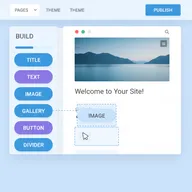
Weebly Free offers the simplest website building experience with an intuitive drag-and-drop interface perfect for complete beginners. It includes basic ecommerce functionality with no transaction fees (unlike competitors), Square integration, and unlimited bandwidth—ideal for simple business sites and personal pages.
Pros
- ✓Extremely easy for beginners
- ✓Basic ecommerce with no transaction fees
- ✓Square payment integration
- ✓Clean weebly.com subdomain
- ✓Unlimited bandwidth included
Cons
- ✗Weebly branding displayed
- ✗Limited ecommerce features on free plan
- ✗Fewer features than competitors

SITE123 Free
SITE123 Free delivers the fastest website creation experience, allowing you to launch a professional-looking site in minutes using pre-structured templates with easy content replacement. The 180+ templates, multilingual support, and included live chat support make it perfect for quick business pages, though customization is limited.
Pros
- ✓Fastest setup time (minutes)
- ✓180+ responsive templates
- ✓Multilingual support built-in
- ✓Free SSL certificate
- ✓24/7 live chat support
Cons
- ✗SITE123 subdomain and branding
- ✗Limited design customization
- ✗1GB monthly bandwidth cap
Carrd Free
Carrd Free specializes in beautiful single-page websites and landing pages with clean carrd.co subdomains and minimal branding. While limited to one-page sites with 50 elements maximum, it's perfect for portfolios, link-in-bio pages, and simple landing pages—and upgrades cost just $9/year.
Pros
- ✓Clean carrd.co subdomain branding
- ✓Minimal '(Made with Carrd)' footer
- ✓Beautiful one-page designs
- ✓Wide style customization
- ✓Ultra-affordable upgrades ($9/year)
Cons
- ✗Only single-page sites allowed
- ✗Limited to 3 sites on free plan
- ✗Max 50 elements per site

Google Sites
Google Sites Free integrates perfectly with Google Workspace, making it ideal for internal company sites, team wikis, and project pages. While design options are limited with just 12 templates, the collaborative editing, automatic mobile optimization, and free custom domain connection offer unique value for Google users.
Pros
- ✓Seamless Google Workspace integration
- ✓Collaborative editing features
- ✓15GB storage (shared with Google account)
- ✓Automatic mobile optimization
- ✓Free custom domain connection
Cons
- ✗Very limited templates (12 only)
- ✗Basic design capabilities
- ✗Less professional appearance

Webflow Free
Webflow Free offers professional-grade design tools for web designers and developers who want complete visual control without coding. The free tier severely limits you to just 2 pages, making it more of a trial than a viable free option, but it's excellent for showcasing design skills or testing the platform.
Pros
- ✓Professional design control
- ✓Code-free visual development
- ✓100+ designer templates
- ✓Export-quality design system
- ✓Great for portfolio showcasing
Cons
- ✗Limited to 2 pages only
- ✗Steep learning curve
- ✗Free plan very restrictive

Strikingly Free
Strikingly Free focuses on mobile-first, one-page websites with beautiful templates optimized for smartphone viewing. While limited to 1 site, 5GB monthly bandwidth, and 1 product if using ecommerce, it's ideal for personal brands, resumes, and simple landing pages that prioritize mobile experience.
Pros
- ✓Mobile-optimized templates
- ✓One-page site specialty
- ✓Simple store (1 product limit)
- ✓24/7 live chat support
- ✓Social media integration
Cons
- ✗Only 1 site on free plan
- ✗5GB monthly bandwidth limit
- ✗Strikingly branding displayed

MailerLite Websites Free
MailerLite Websites Free combines website building with powerful email marketing tools, making it perfect for creators and small businesses focused on building email lists. While website features are basic, the integrated email marketing, pop-up forms, and subscriber management provide unique value for content creators.
Pros
- ✓Email marketing built-in
- ✓Pop-ups and signup forms included
- ✓Subscriber management tools
- ✓Blog functionality
- ✓No MailerLite branding on site
Cons
- ✗Primary focus is email marketing
- ✗Limited website templates
- ✗Requires MailerLite subdomain
Understanding Free Website Builder Limitations
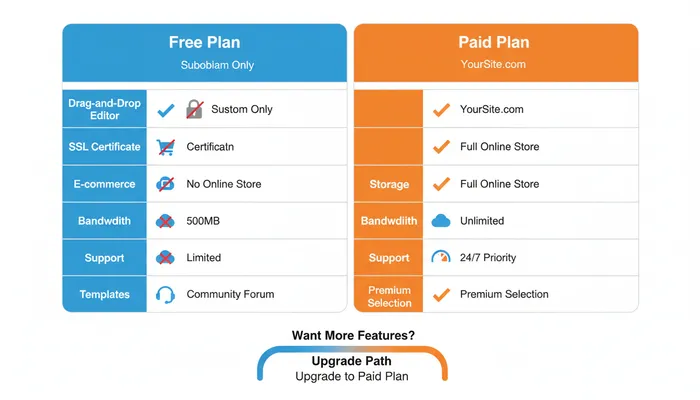
Free website builders come with tradeoffs. Here’s what to expect:
Subdomain Requirements
Instead of yourbusiness.com, you’ll get:
- yourbusiness.wix.com (Wix)
- yourbusiness.weebly.com (Weebly)
- yourbusiness.wordpress.com (WordPress)
- yourbusiness.carrd.co (Carrd)
Subdomains look less professional and hurt credibility for business websites. Custom domains require paid plans (typically $10-20/month).
Platform Branding and Ads
Free plans display provider branding:
- Banner ads at top or bottom of pages
- “Made with [Platform]” badges
- Platform watermarks on images
- Pop-up promotions for upgrades
This advertising subsidizes the free service but impacts professional appearance.
Storage and Bandwidth Limits
Common restrictions include:
- Storage: 500MB to 1GB (enough for 100-200 images)
- Bandwidth: 500MB to unlimited monthly
- File uploads: 2MB maximum file size
- Pages: 1-10 page limitations
Small personal sites work fine, but high-traffic sites or extensive media libraries require upgrades.
Feature Restrictions
Free tiers lock premium functionality:
- No ecommerce (except Square Online and limited Weebly)
- Limited templates and customization
- No SEO tools or analytics integration
- No email marketing automation
- No custom code injection
Business features require paid plans starting at $10-30/month.
Security and Support
Free plans often lack:
- SSL certificates for HTTPS (though many now include free SSL)
- Regular backups and restore functionality
- Priority support or live chat access
- Advanced security features
Professional sites need these features for credibility and safety.
How We Evaluate Free Website Builders
Our testing methodology examines multiple factors:
Template Quality Assessment
We evaluate design options:
- Quantity and variety of templates
- Modern aesthetic and professionalism
- Mobile responsiveness
- Industry-specific options
- Customization flexibility
Feature Testing
We test all free tier capabilities:
- Drag-and-drop editor functionality
- Built-in tools (forms, galleries, blogs)
- SEO and analytics features
- Third-party integrations
- Mobile app availability
Setup Time Analysis
We measure how quickly you can launch:
- Account creation process
- Template selection and customization
- Content addition workflow
- Publishing time from start to finish
Limitation Identification
We document all restrictions:
- Storage and bandwidth caps
- Page and element limits
- Feature locks and paywalls
- Branding and advertising
- Export and migration options
Upgrade Value Evaluation
We assess paid plan value:
- Price points for basic paid plans
- Features unlocked with upgrade
- Custom domain costs
- Transaction fees (for ecommerce)
- Long-term value proposition
When to Use Free vs. Paid Website Builders
Free Builders Work Well For:
- Personal websites and portfolios
- Testing and learning website building
- Temporary projects and event pages
- Internal team sites and wikis
- Link-in-bio pages and simple landing pages
- Hobby blogs and creative projects
Upgrade to Paid Plans For:
- Business websites requiring credibility
- Online stores selling products
- High-traffic sites exceeding bandwidth limits
- Professional portfolios for client work
- Custom domain branding
- Advanced features like SEO, analytics, forms
- Removing ads and platform branding
Tips for Maximizing Free Website Builders
Optimize Your Free Plan
- Choose templates carefully - changing later is difficult
- Compress images before uploading to save storage
- Use external tools for features not included
- Leverage free integrations from app marketplaces
- Monitor bandwidth usage to avoid limits
Plan for Growth
- Check upgrade pricing before committing
- Verify export options if you might migrate later
- Test mobile responsiveness thoroughly
- Use analytics (even basic) to track performance
- Collect emails to build audience ownership
Avoid Common Mistakes
- Don’t use free plans for serious business sites - credibility matters
- Don’t exceed storage/bandwidth limits - sites may go offline
- Don’t ignore mobile optimization - 60%+ traffic is mobile
- Don’t skip backups - even if manual, export your content
- Don’t rely solely on builder SEO - learn basic optimization
Frequently Asked Questions
Can I really build a website for free?
Yes, absolutely. Many reputable website builders offer genuinely free plans that let you create and publish websites at no cost. However, free plans come with limitations like subdomains (yoursite.provider.com), platform branding, reduced storage, and fewer features. For personal projects and portfolios, free plans work well.
What’s the best free website builder for beginners?
Wix Free and Weebly Free are the most beginner-friendly options, offering intuitive drag-and-drop editors with minimal learning curves. Wix provides more templates and features, while Weebly offers simpler functionality with basic ecommerce. SITE123 is also excellent for quick setup if you need a site immediately.
Can I sell products on a free website builder?
Square Online Free is the only website builder offering full ecommerce functionality on the free tier, allowing unlimited products with standard payment processing fees (2.9% + $0.30). Weebly Free offers very limited ecommerce, and Strikingly Free allows only 1 product. Most other builders require paid plans for online stores.
Will my free website look professional?
Free websites can look professional, especially using Wix, WordPress.com, or Carrd templates. However, subdomains (site.provider.com), platform branding, and ads impact credibility. For business sites where trust matters, investing $10-20/month for a custom domain and removing branding significantly improves professionalism.
Can I upgrade my free website later?
Yes, all website builders allow upgrading from free to paid plans at any time. Your content, design, and settings transfer automatically. Paid plans typically start at $10-20/month and add custom domains, remove branding, increase storage/bandwidth, and unlock ecommerce and advanced features.
How much storage do I need for a website?
Most small websites with 10-20 pages and 50-100 images need only 200-500MB of storage. Free plans offering 500MB-1GB are sufficient for most personal sites and portfolios. If you plan extensive photo galleries, video content, or downloadable files, you’ll need paid plans with more storage.
Do free website builders include hosting?
Yes, all free website builders include hosting at no cost. Your site is hosted on the provider’s servers, and you don’t need to worry about server management, security updates, or technical maintenance. This all-in-one approach makes free builders ideal for non-technical users.
Can I use my own domain with a free website builder?
Some free website builders like Google Sites allow connecting custom domains at no extra charge, though you still need to purchase the domain separately ($10-15/year). Most others like Wix, Weebly, and WordPress.com require upgrading to paid plans ($10-20/month) to connect custom domains.