Article
Best Free Antivirus Software in 2026 - Top 10 Free Protection
Protect your devices without paying a dime. We tested the best free antivirus software to find which offer reliable malware detection, real-time protection, and minimal system impact.
Free antivirus software provides essential protection against viruses, malware, ransomware, and phishing attacks without monthly subscription costs, making cybersecurity accessible to everyone.
We tested 12 free antivirus solutions using independent lab results from AV-Test and AV-Comparatives, measuring malware detection rates, system performance impact, and real-world protection. Here are the 10 best free antivirus programs for 2026.
Quick Comparison
| Antivirus | Detection Rate | Platforms | Rating |
|---|---|---|---|
| 1. Avast One Essential | 99.9% detection rate | Windows, Mac, Android, iOS | ★4.7/5 |
| 2. Bitdefender Antivirus Free (Windows) | 99.8% detection rate | Windows only | ★4.6/5 |
| 3. AVG Antivirus Free | 99.7% detection rate | Windows, Mac, Android | ★4.5/5 |
| 4. Microsoft Defender (Built-in) | 99.5% detection rate | Windows 10/11 (built-in) | ★4.4/5 |
| 5. Avira Free Security | 99.6% detection rate | Windows, Mac, Android, iOS | ★4.4/5 |
| 6. Kaspersky Security Cloud Free | 99.7% detection rate | Windows, Mac, Android | ★4.3/5 |
| 7. Malwarebytes Free | Excellent cleanup capability | Windows, Mac, Android, iOS, Chromebook | ★4.2/5 |
| 8. Sophos Home Free | 99.4% detection rate | Windows, Mac | ★4.1/5 |
| 9. ZoneAlarm Free Antivirus | 99.3% detection rate | Windows only | ★4/5 |
| 10. Panda Dome Free | 99.2% detection rate | Windows, Mac, Android | ★3.9/5 |
Our Top Picks in Detail
Avast One Essential
Avast One Essential leads free antivirus with 99.9% malware detection rates in AV-Comparatives testing, real-time protection against viruses and ransomware, and unique features like automatic gaming mode and 5GB weekly VPN access. While it displays upgrade prompts, the core protection rivals premium solutions with minimal system impact.
Pros
- ✓Excellent malware detection (99.9%)
- ✓Includes 5GB/week VPN access
- ✓Gaming mode for uninterrupted play
- ✓Ransomware protection included
- ✓Very lightweight on system resources
Cons
- ✗Frequent upgrade prompts
- ✗VPN limited to 5GB weekly
- ✗Password manager discontinued in 2024
Bitdefender Antivirus Free (Windows)
Bitdefender Antivirus Free achieves near-perfect 99.8% malware detection while remaining incredibly lightweight, passing performance tests with flying colors. Windows-only availability limits its appeal, but for Windows users seeking set-it-and-forget-it protection without performance impact, it's unbeatable—especially with included ransomware and phishing shields.
Pros
- ✓Near-perfect malware detection (99.8%)
- ✓Extremely lightweight design
- ✓No impact on system performance
- ✓Ransomware and phishing protection
- ✓Clean, aggravation-free interface
Cons
- ✗Windows only (no Mac, mobile)
- ✗Limited to basic protection features
- ✗No email or web support

AVG Antivirus Free
AVG Antivirus Free stands out as the only free antivirus offering firewall protection (though limited compared to paid version), plus email, web, and file shields using the same powerful engine as Avast. With 99.7% detection rates and machine learning capabilities, it provides comprehensive protection across Windows, Mac, and Android devices.
Pros
- ✓Only free antivirus with firewall
- ✓Multiple protection layers (email, web, file)
- ✓Machine learning detection
- ✓Same engine as Avast
- ✓Cross-platform support
Cons
- ✗Firewall requires upgrade for full features
- ✗Occasional false positives
- ✗No customer support on free tier
Microsoft Defender (Built-in)
Microsoft Defender (formerly Windows Defender) has improved dramatically, now achieving 99.5% detection rates while being built directly into Windows 10/11. While it lags slightly behind dedicated antivirus in detection and features, the convenience of pre-installation, automatic updates, and complete integration make it excellent baseline protection requiring zero setup.
Pros
- ✓Already installed on Windows
- ✓No third-party software needed
- ✓Integrated with Windows Security
- ✓Regular updates from Microsoft
- ✓Zero additional cost
Cons
- ✗Lower detection than premium options
- ✗Basic feature set
- ✗Windows only

Avira Free Security
Avira Free Security offers 99.6% malware detection plus valuable extras including a free password manager, 500MB monthly VPN access, and browser safety extensions. The polished interface and performance optimization tools make it excellent for users wanting privacy features beyond basic antivirus, though VPN limits and upgrade prompts can be annoying.
Pros
- ✓Password manager included free
- ✓VPN access (500MB monthly)
- ✓Browser safety extensions
- ✓Performance optimizer tools
- ✓User-friendly interface
Cons
- ✗VPN very limited (500MB/month)
- ✗Frequent upgrade notifications
- ✗Some features require registration

Kaspersky Security Cloud Free
Kaspersky Security Cloud Free delivers 99.7% malware detection using cloud-based adaptive security that evolves with threats. Features like account breach checking and a basic password manager add value, though political concerns regarding Russian ownership and privacy policies may deter some users despite excellent protection capabilities.
Pros
- ✓Excellent detection rates (99.7%)
- ✓Cloud-based adaptive security
- ✓Account breach monitoring
- ✓Basic password manager
- ✓Minimal system impact
Cons
- ✗Political concerns for some users
- ✗Limited features vs paid version
- ✗Privacy policy considerations
Malwarebytes Free
Malwarebytes Free excels at finding and removing malware that other antivirus miss, winning 2026 AVLab Product of the Year. The free version provides on-demand scanning without real-time protection, making it perfect as a secondary layer alongside another antivirus for periodic deep scans and stubborn infection cleanup.
Pros
- ✓Exceptional malware removal
- ✓Won 2026 AVLab Product of Year
- ✓No annoying ads or pop-ups
- ✓60-day money-back guarantee
- ✓Lightweight and fast scanning
Cons
- ✗No real-time protection on free tier
- ✗Manual scans only (not automatic)
- ✗Best as secondary scanner

Sophos Home Free
Sophos Home Free brings enterprise-grade security to home users, protecting up to 3 devices (Windows/Mac) with 99.4% detection rates, parental web filtering, and remote management through a central dashboard. The enterprise pedigree ensures quality protection, though mobile device support and advanced features require the premium version.
Pros
- ✓Protects up to 3 devices free
- ✓Parental web filtering included
- ✓Remote management dashboard
- ✓Enterprise-grade protection
- ✓Minimal performance impact
Cons
- ✗Windows and Mac only
- ✗Limited to 3 devices
- ✗Basic features compared to business version

ZoneAlarm Free Antivirus
ZoneAlarm Free Antivirus combines 99.3% malware detection with one of the best free firewalls available, offering application control and identity protection. While Windows-only and slightly more complex than competitors, the dual-layer approach provides comprehensive protection for users comfortable with advanced security settings.
Pros
- ✓Robust firewall included free
- ✓Identity protection features
- ✓Application control
- ✓Safe browsing tools
- ✓Established security brand
Cons
- ✗Windows only
- ✗Can be complex for beginners
- ✗Occasional compatibility issues

Panda Dome Free
Panda Dome Free uses 100% cloud-based scanning, resulting in virtually zero local system impact while achieving 99.2% detection rates. The cloud architecture requires internet connectivity but includes useful features like 150MB daily VPN access and USB device protection, making it ideal for older computers needing lightweight protection.
Pros
- ✓100% cloud-based (minimal local impact)
- ✓VPN included (150MB daily)
- ✓USB device scanning
- ✓Process monitor included
- ✓Very lightweight
Cons
- ✗Requires internet connection
- ✗VPN very limited (150MB/day)
- ✗Fewer features than competitors
Understanding Free Antivirus Limitations
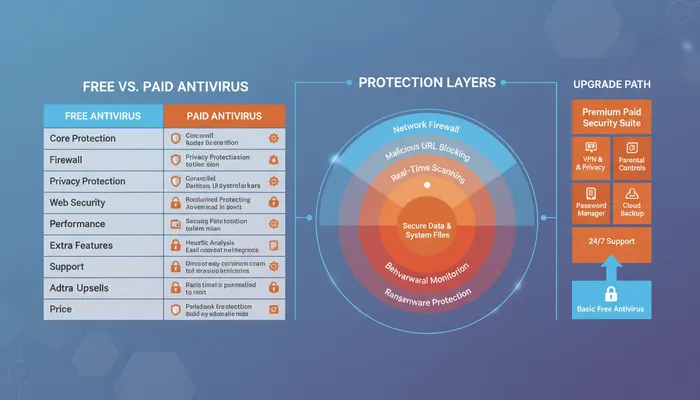
Free antivirus provides essential protection but lacks premium features:
Core Protection Differences
Free antivirus typically includes:
- Real-time malware scanning and removal
- Virus definition updates
- Basic ransomware protection
- Phishing protection (limited)
- On-demand scanning
Paid antivirus adds:
- Advanced ransomware protection
- VPN (unlimited data)
- Password managers (full-featured)
- Parental controls
- Identity theft monitoring
- Firewall (advanced features)
- File shredder and encryption
- Priority customer support
Real-Time Protection Gaps
Most free antivirus includes real-time protection, but:
- Malwarebytes Free lacks real-time scanning (manual only)
- Microsoft Defender provides basic real-time but fewer layers
- Some tools delay updates compared to premium versions
- Advanced threats may require premium detection engines
Performance Considerations
Free antivirus generally performs well:
- Bitdefender Free: Minimal system impact
- Avast/AVG: Lightweight with gaming mode
- Panda: 100% cloud-based (near-zero local impact)
- Microsoft Defender: Well-optimized for Windows
However, premium versions often include:
- Performance optimization tools
- Scheduled scans during idle time
- Resource usage controls
Support Limitations
Free antivirus support is restricted:
- Email support only (no phone or live chat)
- Community forums instead of direct support
- Knowledge base and self-help resources
- Slower response times compared to paid
Premium subscriptions include priority support with live chat and phone access.
Upgrade Prompts
Free antivirus displays:
- Regular upgrade notifications
- Feature comparisons promoting premium
- Banner ads for premium features
- Limited-time discount offers
These prompts subsidize free versions but can be annoying.
How We Evaluate Free Antivirus
Our testing methodology uses multiple sources:
Independent Lab Testing
We rely on trusted testing organizations:
AV-Test (av-test.org):
- Tests protection, performance, and usability
- Scores products out of 6 points per category (18 total)
- Monthly testing of Windows, Mac, Android
- Awards “Top Product” to 17.5+ point scorers
AV-Comparatives (av-comparatives.org):
- Real-world protection tests
- Performance benchmarks
- False positive analysis
- Annual awards for best products
SE Labs:
- Home Anti-Malware Protection ratings
- Small Business Endpoint Protection
- Enterprise Endpoint Protection
Detection Rate Analysis
We examine malware detection capabilities:
- Signature-based detection: Known malware patterns
- Heuristic analysis: Suspicious behavior detection
- Machine learning: AI-powered threat identification
- Zero-day protection: Unknown threat blocking
- False positive rates: Incorrect threat flagging
Performance Impact Testing
We measure system resource usage:
- Full scan impact: CPU and disk usage during scans
- Real-time protection overhead: Background monitoring cost
- Boot time effect: Startup time increase
- Application launching: Program start delays
- Gaming performance: FPS impact during gameplay
Feature Comparison
We evaluate included tools:
- Ransomware protection effectiveness
- Phishing website blocking
- Firewall quality (if included)
- VPN capabilities and limits
- Password manager functionality
- Parental control options
Usability Assessment
We test user experience:
- Interface clarity and design
- Installation ease
- Configuration complexity
- Alert frequency and clarity
- Update process transparency
Types of Threats Detected
Modern free antivirus protects against:
Malware Categories
- Viruses: Self-replicating programs infecting files
- Trojans: Malicious programs disguised as legitimate software
- Worms: Self-spreading malware across networks
- Spyware: Software monitoring activities and stealing data
- Adware: Unwanted advertising software
- Rootkits: Deep system-level infections hiding malware
Advanced Threats
- Ransomware: Encrypts files and demands payment
- Zero-day exploits: Attacks using unknown vulnerabilities
- Phishing: Fake websites stealing credentials
- Cryptojackers: Unauthorized cryptocurrency mining
- Fileless malware: Memory-resident threats without files
Best Practices for Free Antivirus
Maximize protection with these tips:
Keep Software Updated
- Enable automatic virus definition updates
- Install Windows/OS security updates promptly
- Update applications to patch vulnerabilities
- Use automatic update features when available
Practice Safe Browsing
- Don’t download files from untrusted sources
- Verify email sender before opening attachments
- Use strong, unique passwords (password manager)
- Enable two-factor authentication where possible
- Avoid clicking suspicious links
Layer Your Security
- Use built-in firewall (Windows/Mac)
- Keep browser and plugins updated
- Install ad blocker extension
- Use Malwarebytes Free for periodic scans
- Back up important files regularly
Schedule Regular Scans
- Run full system scan weekly
- Quick scan daily if available
- Scan external drives before accessing
- Check quarantine regularly
- Review scan logs for patterns
When to Upgrade to Paid Antivirus
Consider premium antivirus if you need:
Advanced Protection
- Maximum ransomware protection
- Identity theft monitoring and insurance
- Parental controls for family safety
- Advanced firewall with application control
- Secure file deletion and encryption
Enhanced Privacy
- Unlimited VPN for browsing privacy
- Full-featured password manager
- Secure online payment protection
- Webcam and microphone protection
- Dark web monitoring for leaked credentials
Better Support
- 24/7 phone and live chat support
- Remote assistance for issues
- Dedicated account representative
- Faster response times
- Proactive threat notifications
Multi-Device Coverage
- Protect 5-10 devices with one subscription
- Cross-platform support (Windows, Mac, mobile)
- Centralized management dashboard
- Family plan options
- Consistent protection across all devices
Frequently Asked Questions
Is free antivirus good enough?
Yes, for basic protection. Free antivirus like Avast, Bitdefender, and AVG achieve 99%+ malware detection rates comparable to paid versions. They protect against viruses, malware, and ransomware effectively. However, paid antivirus adds VPN, password managers, identity theft protection, and premium support worth considering for comprehensive security.
What’s the best free antivirus?
Avast One Essential is the best overall free antivirus, offering 99.9% detection rates, real-time protection, gaming mode, and 5GB weekly VPN access. For Windows-only users, Bitdefender Antivirus Free provides near-perfect 99.8% detection with zero performance impact. Both outperform many paid competitors in core protection capabilities.
Is Windows Defender enough protection?
Windows Defender (Microsoft Defender) provides adequate baseline protection with 99.5% detection rates in recent tests. For most users with safe browsing habits, it’s sufficient. However, third-party options like Bitdefender or Avast offer better detection (99.8-99.9%), additional features, and lower false positive rates worth considering.
Do free antivirus programs slow down my computer?
Quality free antivirus has minimal performance impact. Bitdefender Free and Panda (cloud-based) show near-zero slowdown. Avast and AVG are lightweight with gaming modes that reduce impact further. According to AV-Test, top free antivirus scores 5.5-6/6 for performance, meaning negligible system slowdown during normal use.
Can I use multiple free antivirus programs together?
No, don’t run multiple real-time antivirus programs simultaneously—they’ll conflict, causing system instability and reduced protection. However, you can use one main antivirus (like Avast) plus Malwarebytes Free for periodic manual scans, as Malwarebytes Free doesn’t include real-time protection and serves as a complementary scanner.
Does free antivirus protect against ransomware?
Yes, most modern free antivirus includes ransomware protection. Avast, Bitdefender, AVG, and Microsoft Defender all detect and block ransomware. However, paid versions often add behavior-based detection and automatic backup features for better ransomware defense. Always maintain offline backups regardless of antivirus protection.
How often should I scan with free antivirus?
Run a full system scan weekly and quick scans daily if available. Most free antivirus provides real-time protection that continuously monitors for threats, so scheduled scans catch anything missed. Enable automatic scanning if your antivirus supports it, and always scan external drives before accessing files.
Will free antivirus protect my phone?
Some free antivirus extends to mobile devices—Avast, AVG, Avira, Kaspersky, and Malwarebytes offer Android and iOS apps. However, mobile versions often have fewer features than desktop versions. For iPhones, antivirus is less critical due to iOS security architecture, but Android users should use mobile antivirus for app scanning and web protection.